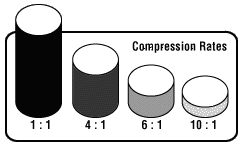
Audio Compression can be one of two categories, lossless or lossy. Lossless compression algorithms return audio data that is identical to the original audio information. Lossless compression sounds wonderful, however it does not yield an extremely high compression ratio. Typically, lossless routines give a ratio no higher than 2:1 for realtime playback for audio with a full dynamic range.
Lossy Audio Compression can yield a variety of different rates of compression based on the ability of your hardware and software to decode and playback the music audio data in real-time. There are various compression schemes to achieve different results; for example, many codecs remove portions of the audio signal that human hearing is less sensitive to. To some peoples ears the resulting audio has distinguishing artifacts or characteristics that change the listening experience. The final "quality" level is largely a matter of personal perception.
Each different encoder/decoder (CODEC) has different strengths and weaknesses. Typically, ENCODING takes a long period of time and large amounts of processing power. DECODING must be real time or faster -- able to decode and play simultaneously -- to be useful for an "on demand" digital audio playback system.
MPEG
The Moving Pictures Experts Group (MPEG) put a considerable amount of research into ways of compressing video and audio to make movies fit onto compact discs.
A wide variety of software and hardware encoders and decoders currently exist.
For a very technical and detailed review of MPEG, you can read the online FAQ about MPEG.
Strangely (notice the "P" for pictures) the compression levels for video are well over 20:1, and MPEG audio compression loses quality quickly at compression levels higher than a 6:1 compression ratio.
MPEG Audio compression continues to degrade until it becomes absolutely dismal at 24:1 compression.
An extension to MPEG-1 and MPEG-2 audio called 'Layer 3' (commonly known by its file extension, MP3) has been developed allowing greater compression levels and more BIT DEPTH options.
Software routines for MPEG audio decoding are fast to decode with relatively low quality loss, but generally speaking it takes a LONG time to encode.
MPEG-4 has been ratified as a standard, and new codecs will become available in the not-too-distant future.
The compression ratio for MPEG compression can be adjusted across a wide range of quality levels, however sound quality drops as the compression is increased.
Since MPEG audio uses a perceptual model, the exact perceived amount of lost quality varies for each individual listener.
Trying to maintain the highest quality (without extremely noticeable signal loss) yields the following compression ratios:
Layer 1 = 1:4 (384 kbps for stereo)
Layer 2 = 1:6 or 1:8 (256 kbps or 192 kbps for a stereo signal)
Layer 3 = 1:10 or 1:12 (128 kbps or 112 kbps for a stereo signal)
MPEG I Layer 3
This format was invented at the Fraunhofer IIS.
Online info is located at http://www.iis.fraunhofer.de/EN/bf/amm/products/mp3/mp3.jsp
They somehow managed to get the technology patented and also adopted as a international standard.
When it was introduced, it was marketed as able to produce CD Quality audio when only using 128k bitrate stereo encoding.
It is now widely known that 128k mp3 files are not CD Quality, but it is still the reference encoder.
There is an open source project called LAME (http://lame.sourceforge.net/).
Because of patent issues, it is officially distributed only in source code form.
The LAME project started as LAME Ain't an Mp3 Encoder and has grown to be a proven and reliable mp3 encoder that sounds excellent at higher bitrates.
Keep in mind that mp3 is not a lossless audio format.
The quality issues with mp3 are typically not because of a limitation of the compression format, but a common practice of compressing the audio to a bit rate lower than 128 kbps.
Recommended bitrates for mp3 are 160 or higher.
MPEG I Layer 3 VBR
People started to figure out that mp3 is not really CD quality, but they still want files as small as possible for Interent file transfer. Enter mp3 Variable Bit Rate (VBR). When you are using Constant Bit Rate (CBR), every audio frame has the same level of compression for the same period of time. Then somebody said, "Why not compress silent sections of music more agressively? Compressed silence doesn't lose any quality." The details are dependant on the encoder and settings you use, but generally speaking, VBR files use different levels of compression in different sections of the same track. In theory this means you get a balance of the best quality of audio in the smallest possible file size.